Mungkin bagi anak - anak elektro ini sudah menjadi bacaan yang biasa, namun bagi saya, saya masih terkagum - kagum kok bisa ya hanya dengan menggunakan 1 baterai 1.5 volt bisa menyalakan beberapa lampu LED dimana 1 lampu LED sendiri pada umumnya membutuhkan 1.8 volt untuk menyala.
Bisa dilihat schematicnya cukup sederhana, dimana hanya ada induktor, transistor NPN, resistor dan lampu LED untuk outputnya. Induktor disini menggunakan toroid yang bisa didapatkan dari bekas PSU komputer atau pada lampu CFL.
Saya tertarik untuk mencobanya, saya mendapatkan 2 buah toroid besar dan kecil dari bekas PSU dan bekas lampu CFL yang sudah mati. Saya menggunakan bekas kabel LAN untuk membuat gulungan pada toroidnya.
Yang perlu diperhatikan dalam pembuatan gulungan disini adalah arah pada saat kita menggulung. Arah gulungan primer dan sekunder harus sama, biar enak, gulung searah jarum jam.
Jumlah gulungan disini saya agak cuek.
Entah kok bisa begitu saya kurang tahu, karena saya juga melakukanya trial and error. Belum saya cek, bisa bertahan berapa lama lampu tersebut menyala dengan 1 baterai. Tapi kesimpulanya bisa !
Saya juga sempat mencoba dengan toroid lampu CFL yang lebih kecil dengan banyak gulungan 7:7. Hasilnya lumayan bagus juga, lampunya menyala terang, namun karena diameter toroidnya terlalu kecil jadi malas untuk mengganti jumlah gulungan.
Mungkin jika anda melakukan yang lebih "sangar" tentang Joule Thief ini bisa sharing disini :)
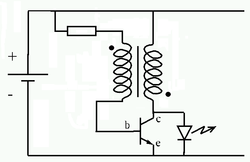 |
| Schematic Joule Thief by Wikipedia |
Saya tertarik untuk mencobanya, saya mendapatkan 2 buah toroid besar dan kecil dari bekas PSU dan bekas lampu CFL yang sudah mati. Saya menggunakan bekas kabel LAN untuk membuat gulungan pada toroidnya.
Yang perlu diperhatikan dalam pembuatan gulungan disini adalah arah pada saat kita menggulung. Arah gulungan primer dan sekunder harus sama, biar enak, gulung searah jarum jam.
Jumlah gulungan disini saya agak cuek.
- Percobaan pertama kali saya menggunakan gulungan dengan jumlah gulungan 7:21, hasilnya tidak menyala :|
- Percobaan kedua saya menggunakan jumlah gulungan 9 dengan 35 hasilnya lampu menyala redup
- Percobaan ketiga karena saya sudah agak malas, saya memenuhi toroid dengan gulungan kabel tersebut dan hasilnya malah lampu menyala terang :)
 |
| Joule Thief dengan Toroid PSU |
Saya juga sempat mencoba dengan toroid lampu CFL yang lebih kecil dengan banyak gulungan 7:7. Hasilnya lumayan bagus juga, lampunya menyala terang, namun karena diameter toroidnya terlalu kecil jadi malas untuk mengganti jumlah gulungan.
Mungkin jika anda melakukan yang lebih "sangar" tentang Joule Thief ini bisa sharing disini :)
Comments
Post a Comment