Raspberry Pi model B+ akhirnya resmi dirilis di situsnya yang dapat anda kunjungi di http://www.raspberrypi.org/introducing-raspberry-pi-model-b-plus/. Hal ini semakin membuat saya galau saja, belum kesampaian mengicipi model B sudah muncul saja model yang baru B+. Dari segi harganya diberitakan akan sama yaitu sekitar $35, antara Rp. 400 - 450 ribu mungkin sampai Indonesia.
Menurut situsnya, model B+ ini akan memiliki chip aplikasi prosesor yang sama yaitu model BCM2835 buatan Broadcom, dapat anda lihat selengkapnya di http://www.broadcom.com/products/BCM2835. Begitu juga dengan RAMnya yang sama dengan model sebelumnya yaitu sebesar 512 MB. Berikut adalah daftar perbedaan dari model B+ dengan model B :
Jika anda belum punya dan ingin mempunyai Raspberry Pi dalam waktu dekat, saran saya mending pakai yang model B dulu, karena tidak ada perbedaan yang berarti. Semua upgrade diatas sebenarnya dapat kita akali sendiri. Misalnya seperti jumlah USB port yang terbatas dapat memakai USB HUB untuk menambah colokan USB. Sedangkan jika kita membutuhkan GPIO yang lebih banyak, dapat membuat sendiri IO Expander dengan menggunakan MCP230xx yang dapat anda baca selengkapnya di https://learn.adafruit.com/mcp230xx-gpio-expander-on-the-raspberry-pi.
Menurut situsnya, model B+ ini akan memiliki chip aplikasi prosesor yang sama yaitu model BCM2835 buatan Broadcom, dapat anda lihat selengkapnya di http://www.broadcom.com/products/BCM2835. Begitu juga dengan RAMnya yang sama dengan model sebelumnya yaitu sebesar 512 MB. Berikut adalah daftar perbedaan dari model B+ dengan model B :
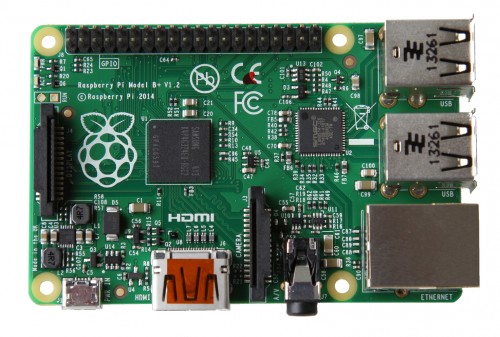
- Pin GPIO, dibanding model B yang hanya 26 pin, model B+ ini dapat mencapai 40 pin.
- Port USB, dibanding dengan model B, jumlah port USB 2.0 pada model B+ mencapai 4 port
- Slot Micro SD, pada model ini sudah tidak menggunakan SD Card, namun sudah menggunakan micro SD.
- Hemat daya, dibanding dengan model B, model B+ lebih rendah konsumsi dayanya, antara 0.5 W hingga 1 W.
- Output Suara, model B+ memiliki kualitas suara yang lebih baik
- Desain board, desain board dari model B+ lebih baik, mulai dari peletakan USB port dan jack 3.5mm.
Raspberry Model B+
Jika anda belum punya dan ingin mempunyai Raspberry Pi dalam waktu dekat, saran saya mending pakai yang model B dulu, karena tidak ada perbedaan yang berarti. Semua upgrade diatas sebenarnya dapat kita akali sendiri. Misalnya seperti jumlah USB port yang terbatas dapat memakai USB HUB untuk menambah colokan USB. Sedangkan jika kita membutuhkan GPIO yang lebih banyak, dapat membuat sendiri IO Expander dengan menggunakan MCP230xx yang dapat anda baca selengkapnya di https://learn.adafruit.com/mcp230xx-gpio-expander-on-the-raspberry-pi.
Comments
Post a Comment